
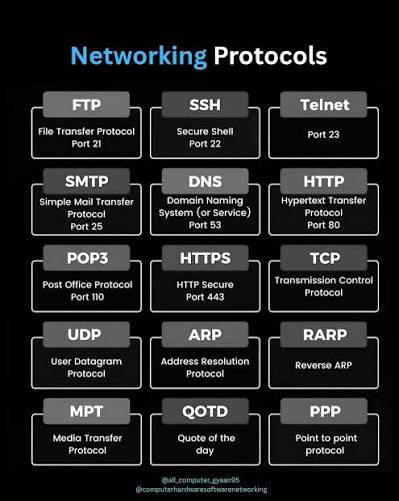
Every systems administrator has experienced the frustration of a remote session that feels unreliable — commands that execute with unpredictable delays, terminal sessions that disconnect without obvious cause, file transfers that stall at arbitrary points before resuming. The instinct in these situations is to blame the network, upgrade the bandwidth, or restart the connection. These are reasonable responses, but they address symptoms rather than mechanisms. The administrator who understands what is actually happening at each layer of the protocol stack that underlies remote connections is better equipped to diagnose failures precisely, configure sessions for the specific performance characteristics their environment requires, and avoid the class of problems that arise from misconfiguration rather than infrastructure limitations.
The Protocol Layers That Determine Remote Session Performance
From TCP to Application: What Each Layer Contributes and Where It Fails
The remote connection session that a systems administrator establishes through an SSH client like MobaXterm is not a simple pipe between two endpoints. It is a layered architecture in which each protocol layer provides specific services to the layer above it and depends on specific services from the layer below it. Performance problems at any layer produce symptoms that surface at the application layer — the terminal session the administrator experiences — but that cannot be diagnosed or resolved by working only at that layer.
At the transport layer, TCP provides the reliability and ordering guarantees that SSH and other remote connection protocols depend on. TCP’s retransmission mechanism ensures that every byte sent by the server arrives at the client, in order, without gaps. This guarantee comes at a cost: when a packet is lost, TCP pauses transmission and waits for retransmission before delivering subsequent data that has already been received. In environments with non-trivial packet loss rates — mobile data connections, degraded WiFi, high-utilisation enterprise networks — this retransmission behaviour is the primary cause of the intermittent stalling that administrators experience as session unreliability.
The TCP window size — the amount of unacknowledged data that can be in transit at any time — is one of the most important configuration parameters affecting remote session throughput on high-latency connections. A TCP window size that is smaller than the bandwidth-delay product of the connection (bandwidth multiplied by round-trip time) limits throughput to a fraction of the available bandwidth regardless of how much bandwidth the network provides. Administrators connecting to remote servers over transcontinental links often experience this limitation: a 100 Mbps connection with 200ms round-trip time requires a TCP window size of approximately 2.5 MB to fully utilise the bandwidth, but default operating system settings frequently use window sizes an order of magnitude smaller. TCP window scaling, enabled by default on modern operating systems but sometimes disabled by network equipment or legacy configurations, addresses this limitation by allowing window sizes larger than the original TCP specification’s 64KB maximum.
At the application layer, the latency sensitivity of different connection types varies significantly in ways that determine which protocol optimisations matter most. SSH terminal sessions are highly sensitive to round-trip latency because every keystroke typed in the terminal is sent to the remote server and the server’s response must return before the local terminal can update. A 100ms round-trip time makes terminal interaction feel sluggish to most users; a 200ms round-trip makes interactive use genuinely uncomfortable. SSH file transfers, by contrast, are throughput-sensitive rather than latency-sensitive — what matters is how fast data can move, not how quickly each interaction completes.
Real-time interactive applications of all kinds share this latency sensitivity, and the engineering challenges of delivering low-latency interactive sessions have been studied extensively across domains far beyond traditional remote computing. A desi play live casino games platform illustrates the practical stakes of this problem: the live dealer streams must maintain latency low enough that player decisions remain temporally connected to the dealer’s actions — a card turned, chips placed, a game outcome announced — or the interactive quality of the experience breaks down. The engineering infrastructure that achieves sub-second latency for a live video stream serving thousands of concurrent users shares fundamental principles with the network configuration that makes an SSH session feel responsive rather than laggy: aggressive packet prioritisation, keep-alive mechanisms that detect and recover from connection drops quickly, and protocol-level compression that reduces the data volume that must transit the connection without sacrificing the information that the user needs to see.
The SSH Protocol’s Specific Performance Characteristics
SSH adds its own performance layer above TCP that is worth understanding specifically, because many of the performance problems that administrators experience in SSH sessions are attributable to SSH configuration rather than network infrastructure.
SSH encryption introduces computational overhead that was significant on the hardware of twenty years ago and is generally negligible on modern processors, but cipher selection still affects performance in specific high-throughput scenarios. The AES-128-CTR and ChaCha20-Poly1305 ciphers available in modern SSH implementations are hardware-accelerated on most server processors and produce minimal overhead in practice. Older ciphers that lack hardware acceleration can become throughput bottlenecks when transferring large files over fast connections, though this is rarely the cause of the sluggishness that administrators most commonly encounter.
SSH compression — enabled with the -C flag in OpenSSH or through MobaXterm’s compression settings — reduces the data volume transmitted through the SSH connection by applying compression to the data stream. On high-latency, low-bandwidth connections (such as mobile data or satellite links), compression reduces the time required to transmit a given amount of data and can substantially improve perceived responsiveness. On low-latency, high-bandwidth connections (local network or fast broadband), compression adds computational overhead without providing proportionate benefit, because the bottleneck is not data volume but the round-trip latency of each interaction. Understanding which constraint limits the session allows the administrator to configure compression appropriately rather than applying it universally.
SSH multiplexing — using a ControlMaster connection to share a single TCP connection across multiple SSH sessions — addresses the connection establishment overhead that makes opening many SSH sessions to the same host inefficient. Each new SSH connection requires a cryptographic handshake that takes several round trips to complete, which is perceptible on high-latency connections. With multiplexing configured, subsequent connections to the same host reuse the existing cryptographic session and establish in milliseconds rather than the several hundred milliseconds that a full handshake requires on a transatlantic connection.
MobaXterm-Specific Configuration for Protocol Optimisation
Applying Protocol Understanding to Client Configuration
MobaXterm provides configuration access to most of the SSH protocol parameters that affect session performance, and understanding the protocol stack described above makes the purpose of each setting clear rather than requiring administrators to apply configuration changes on the basis of forum recommendations without understanding what they are changing.
The SSH settings panel in MobaXterm’s session configuration exposes cipher selection, compression settings, keep-alive parameters, and forwarding configurations. Keep-alive settings are among the most practically important for administrators who maintain persistent remote sessions — the server-side SSH keep-alive interval determines how long an inactive connection will be maintained before the server considers it dead and closes it, and the client-side keep-alive determines how frequently MobaXterm sends packets to prevent intermediate network equipment from timing out the connection.
Corporate firewalls, NAT devices, and stateful inspection appliances frequently close idle TCP connections after a timeout period that varies by device and configuration. An SSH session that has been inactive for five minutes may be closed by a firewall that times out TCP connections at that interval, producing the “broken pipe” error that appears when the administrator attempts to resume the session after a period of inactivity. Configuring MobaXterm’s keep-alive to send packets every sixty seconds prevents this by ensuring that no five-minute period of inactivity occurs from the firewall’s perspective.
The numbered configuration sequence for optimising MobaXterm SSH sessions for different connection environments is as follows:
- For high-latency connections (100ms+): Enable compression in session settings, configure aggressive keep-alive intervals (30–60 seconds), and use the Mosh extension or a similar latency-tolerant protocol for interactive sessions where terminal responsiveness is the primary concern
- For high-throughput file transfer requirements: Disable compression (which adds overhead without benefit on fast connections), select AES-128-CTR or ChaCha20-Poly1305 as the cipher (for hardware acceleration), and use SCP or SFTP with large transfer buffer sizes configured in MobaXterm’s file transfer settings
- For multi-session environments: Configure SSH multiplexing through MobaXterm’s master connection settings, which allows all sessions to a given host to share a single authenticated connection and eliminates the per-session handshake overhead that makes opening many sessions sequentially slow on high-latency links
- For unreliable network conditions (mobile, WiFi): Configure automatic reconnection with session state preservation, enable the Mosh protocol where server-side support is available (Mosh uses UDP rather than TCP and is designed specifically for connections with packet loss and address changes), and set SSH keep-alive intervals short enough to detect connection drops before the user experiences them as apparent freezes
The characteristics of SSH session configurations that most reliably maintain responsiveness across variable network conditions are:
- Short keep-alive intervals that detect and respond to connection drops before the user experiences extended unresponsive periods
- Appropriate compression settings that are enabled for bandwidth-constrained environments and disabled for bandwidth-abundant ones
- Multiplexing for environments with many simultaneous connections to the same hosts, which reduces both connection establishment overhead and the total number of TCP connections that network equipment must maintain
Conclusion: Protocol Understanding Is Operational Capability
The administrator who understands why a remote session is behaving as it does is in a fundamentally better operational position than one who applies configuration changes and observes results without knowing why they produced the observed effect. The protocol stack described here — TCP’s reliability mechanisms and their performance implications, SSH’s encryption and compression trade-offs, the keep-alive mechanisms that maintain connections through network equipment with aggressive idle timeouts — provides the conceptual framework within which specific configuration decisions make sense rather than requiring memorisation of recommended settings without understanding. MobaXterm’s configuration interface exposes all of these parameters; the protocol knowledge is what makes the interface a precision tool rather than a collection of opaque settings.