
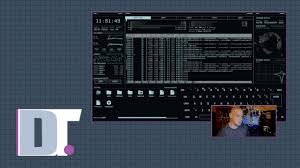
The command line is one of the most powerful parts of any computer system, but many users still see it as plain, boring, or difficult to use. A traditional terminal usually gives only text on a simple screen. That works well for speed, but it does not always feel engaging. This is why edex ui became interesting for many developers, learners, and technology lovers. It gives the terminal a futuristic look while keeping useful command-line features available in one interactive workspace.
A Different Way to Use the Terminal
Most terminal applications are made for simple command input and output. They are practical, but they usually do not focus on the overall user experience. eDEX UI takes a more creative approach by turning the terminal into a full-screen visual environment.
Instead of opening a small command window, users get a complete interface with multiple panels. These panels can show system data, file information, keyboard input, and live activity. This makes the experience feel more like using a high-tech dashboard than a basic terminal.
Why eDEX UI Appeals to Developers
Developers often spend a lot of time inside terminals. They run commands, test scripts, manage files, use Git, install packages, and monitor systems. A clean terminal is useful, but a more visual interface can make the work feel fresh and enjoyable.
eDEX UI gives developers a stylish environment where they can still perform common terminal tasks. It is especially appealing for developers who enjoy custom setups, cyberpunk themes, or futuristic workspaces. While it may not replace every lightweight terminal, it can make coding sessions, demos, and experiments more visually interesting.
A Strong Visual Identity
One of the main reasons eDEX UI is remembered is its strong visual identity. Many tools perform useful tasks, but only a few are instantly recognizable from a screenshot. eDEX UI has that quality.
Its sci-fi inspired layout, glowing interface, and full-screen dashboard make it stand out. Users who see it for the first time often become curious because it looks different from normal software. This visual appeal helps it stay popular among tech communities, even when many other terminal tools are available.
Useful for System Awareness
A good terminal helps users control their computer, but eDEX UI also helps users observe what is happening on the system. It can display information such as processor activity, memory usage, network status, and file structure.
This kind of system awareness is helpful for users who like to understand their machine better. Instead of switching between multiple tools, they can view important details in one place. For learners, this can also make computer operations easier to understand.
Best Features of eDEX UI
eDEX UI combines style and function in a way that makes it different from many other terminal tools. It is designed for users who want more than a plain text window.
Some of its best features include:
- Futuristic full-screen workspace
- Real command-line interaction
- Live system monitoring panels
- File and directory navigation
- Eye-catching sci-fi interface
- Multi-platform availability
- Custom desktop setup potential
- Great visuals for tech content
These features make it useful for both practical tasks and creative presentation.
Great for Learning Command-Line Basics
For beginners, learning terminal commands can feel intimidating. Many new users are not comfortable with a plain command-line window at first. eDEX UI can make the experience feel less boring because it adds visual feedback and a structured layout.
When users type commands and also see system panels around them, they may feel more connected to what is happening. This can make basic practice more interesting. It is not a replacement for learning the command line properly, but it can make the process more enjoyable.
A Helpful Tool for Presentations and Demos
eDEX UI is also useful for presentations, tutorials, and demonstrations. A normal terminal screen may look too simple during a video or live demo. eDEX UI adds a professional and futuristic look that can capture attention quickly.
This is one reason tech creators, teachers, and reviewers may like it. When explaining commands, system tools, or development workflows, a visually strong interface can make the content more appealing. Many users visit an eDEX UI website because they want to learn more about the tool and try it for their own setup.
eDEX UI and Desktop Customization
Desktop customization is popular among users who want their computer to reflect their personal style. Some users prefer clean minimal layouts, while others enjoy bold and futuristic designs. eDEX UI fits well into the second category.
It can turn a normal desktop into something that feels like a sci-fi workstation. When paired with a matching wallpaper, dark theme, and custom icons, the whole setup can look very impressive. For users who care about design, this is a major advantage.
Practical Limitations to Consider
Although eDEX UI is attractive, it is important to use it with realistic expectations. Because it has a rich visual interface, it can use more resources than a standard terminal. Users with older computers may notice slower performance compared to lightweight terminal apps.
Also, professional developers who need maximum speed may prefer a simpler terminal for daily work. eDEX UI is best used when the visual experience matters, such as learning, experimenting, recording content, or building a themed workspace.
Why eDEX UI Still Has Value
Many software tools become outdated quickly, but eDEX UI still has value because it offers something unique. Its design is memorable, and its concept is different from common terminal applications. It shows that even technical tools can be creative and visually exciting.
For users who enjoy experimenting with their system, eDEX UI can provide a fresh way to interact with the command line. It may not be the most minimal option, but it delivers an experience that many users remember.
Conclusion
eDEX UI is not just another terminal emulator. It is a creative, futuristic, and visually rich command-line environment built for users who want something different. It combines terminal access, system monitoring, and sci-fi inspired design into one full-screen workspace.
For developers, learners, content creators, and customization fans, eDEX UI offers a unique experience. It makes the terminal feel more modern and engaging while still keeping practical functionality available. Anyone who wants a more exciting way to explore the command line may find eDEX UI worth trying.